Choose Your Business Vertical

Explore Omega ERP. Select the industry that best represents your business.

Skip to inventory content
Omega Inventory · POS + ERP

Every product.
Every location.
Every movement.

Manage stock, purchasing, warehouses, recipes, food costs and inventory reporting from one connected platform. Bring your point of sale and back-office inventory together, wherever business takes you.

Restaurants & retailMultiple locationsConnected to Omega POS
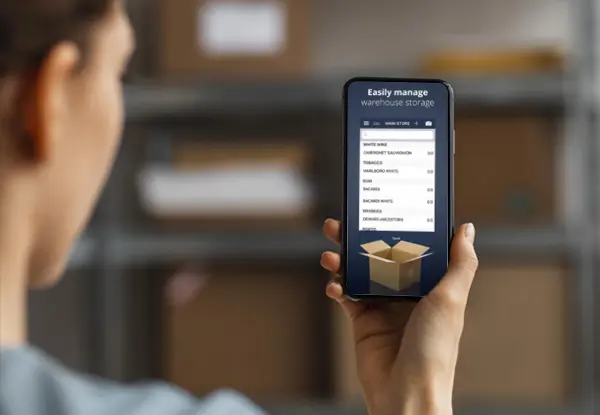
An operator viewing warehouse stock on a smartphone with Omega Inventory
One connected view of your stock.From the warehouse to the shop floor. From ingredients to the plate.
Stock you can seeQuantities, value & movements
Purchasing with clarityOrders, receiving & suppliers
Costs you can understandRecipes, wastage & COGS
Locations working togetherBranches, stores & warehouses
Everyday control

From the first delivery
to the final stock count.

Keep purchasing, stock movement and inventory control connected, so your team can make informed decisions throughout the day.

Centralized stock control

See every product. Follow every movement.

Monitor real-time stock quantities and value across your stores, warehouses and branches. Review inventory changes over time from one consistent operational view.

  • Real-time quantities and stock value
  • Stock movement history
  • Low-stock alerts and replenishment visibility
Purchasing & suppliers

A clearer path from order to delivery.

Connect purchase orders, goods receiving, supplier returns and purchase costs with your inventory. Use stock levels and supplier history to inform your next order.

  • Purchase orders and goods received
  • Customer and supplier returns
  • Product cost tracking over time
Warehouses & transfers

The right stock, in the right place.

Manage multiple warehouses, stores and branches. Record transfers between locations and compare availability so your team can plan stock movements with confidence.

  • Multi-branch and multi-store visibility
  • Transfers between locations
  • Stock availability and costs by branch
Counts & adjustments

Know what is really on the shelf.

Schedule stock counts and compare physical quantities with system balances. Identify discrepancies, record adjustments and reduce manual stock-taking errors.

  • Scheduled inventory counts
  • Physical versus expected stock
  • Variance review and stock adjustments
For restaurants, cafés & kitchens

Understand food cost.
Ingredient by ingredient.

Manage multi-level recipes and ingredients. Understand how purchase costs affect each dish, track wastage and lost goods, and review food costs across your branches.

  • Multi-level recipes and ingredient management
  • Recipe costing and configured POS ingredient consumption
  • Wastage and lost-goods tracking
  • Cost of goods sold by period and branch
Recipe costing, made clearerInteractive example

What does one dish cost?

Try a recipe cost and selling price to understand their relationship.

Food cost percentage25.0%

Illustrative calculation: ingredient cost ÷ selling price × 100. Sample values only; excludes labor, overhead, tax and wastage. This is not an Omega product screen.

Omega inventory tools for organizing stock and business operations
Sizes & colorsSerial numbersReturnsMultiple stores
For retail & multi-store businesses

The right product.
In the right store.

Keep a clearer view of product variants, stock availability and returns. From fashion and electronics to supermarkets, connect your retail operations across locations.

  • Size and color management
  • Serial numbers and barcode workflows for your setup
  • Customer returns and returns to suppliers
  • Low-stock alerts and multi-store stock visibility
Ask Omega AI · Inside Omega ERP

Your inventory.
Your business.
Just ask Omega AI.

Ask anything about your business in your own words. Explore stock, purchasing, costs, sales and branch performance with Ask Omega AI, right inside Omega ERP.

Start with the question on your mind. Add a product, branch or date range to make it yours, without searching for the right report first.

  • Questions in everyday language
  • Insights across stock, costs and business performance
  • Support for questions in Arabic

Open Omega ERP and select Ask Omega AI. Availability depends on your plan and setup.

What would you like to know?

Example questions to ask inside Omega ERP

  • Which items should I review for reordering?
  • Which purchases are driving my costs?
  • What are my slowest-selling products this month?
  • Which items have the highest cost?
  • How do my branches compare this month?
Make the question yours.

“What are my top five items by revenue at my Beirut branch this month?”

Valuation & reporting

Know your stock.
Understand your costs.

Track product costs over time and turn inventory activity into a clearer operational picture. Compare branches and review cost of goods sold over the periods that matter to you.

  • Real-time stock value and real cost of goods
  • Comparative cost by branch
  • Weekly, monthly and yearly COGS
  • Dashboards and inventory analytics
Omega reporting tools for reviewing inventory costs and business figures
One connected ecosystem

Inventory belongs
with the rest of your business.

Connect stock and purchasing with POS, accounting and ERP operations. Give your teams a shared view while reducing duplicate data entry.

Built around your business

From a neighborhood café
to a multi-branch operation.

RestaurantsCafésBakeriesQSR & cloud kitchensSupermarketsFashion retailElectronicsHospitalityMulti-branch businesses
A team beside you

Make your next move
with confidence.

Review your products, locations and workflows with the Omega team. Build an onboarding plan that helps your people get comfortable with their inventory tools.

One-on-one onboardingGuidance for your team and your setup.
Account supportDiscuss the right support level for your business.
24/7 support optionsConfirm coverage by subscription and market.
A few useful answers

Inventory questions,
answered.

Can I ask Omega AI about my inventory and business?

Yes. Open Omega ERP and select Ask Omega AI to ask business questions in your own words. Explore stock, purchasing, costs, sales and branch performance. Add an item, location or date range for context. Ask our team to confirm availability for your plan and setup.

What does Omega Inventory management software include?

Omega Inventory brings together stock quantities and value, purchasing, goods receiving, supplier returns, warehouses, transfers, stock counts and reporting. Restaurant and retail capabilities connect inventory with Omega POS and ERP.

Can I manage multiple branches and warehouses?

Yes. Monitor inventory across multiple branches, stores and warehouses, record transfers between locations and compare availability and costs by branch.

Does Omega support restaurant recipes and food costing?

Yes. Manage ingredients and multi-level recipes, track wastage and lost goods, and review food costs and cost of goods sold. Ask our team to demonstrate how POS sales connect to ingredient consumption in your configured setup.

Can I track retail sizes, colors and serial numbers?

Yes. Omega supports size and color management, serial numbers, stock availability and returns across retail locations. Ask for a demonstration of the barcode workflows available for your setup.

Is inventory connected with POS and accounting?

Yes. Omega Inventory connects stock and purchasing with Omega POS, accounting and ERP operations, helping reduce duplicate entry and disconnected workflows.

Is Omega Scan supplier invoice capture available?

Omega Scan invoice capture and advanced production workflows are availability-dependent. Contact Omega to confirm release status, supported workflows and availability for your market and subscription.

How do I get started, and what support is available?

Request a demo to review your locations, products and workflows with the Omega team. Ask about one-on-one onboarding, account support and 24/7 support options; availability depends on your subscription and market.
Start with Omega

Ready to run your business on one platform?

Discover how Omega can connect your sales, operations, finance, employees and customers in one business ecosystem.